
What is covered in this article?
- New Reason for Selection Chart
- Download Apps as PDFs
- Email Template Selector
- Default Order for Student List
- Event Specific Registration Forms
- Apply Enhancements
- Improvements
Release Version: 2.4
Below is a summary of what's new in this latest release
New Reason for Selection Chart
When we released Apply we added a question asking why families were choosing your school. While you can always download that data in CSV file, we have now included a new chart under the Research section that plots those responses provided by each families for their respective students.
Note: this chart will only be visible if you have the Apply module turned on and collecting data.
Download Apps as PDFs
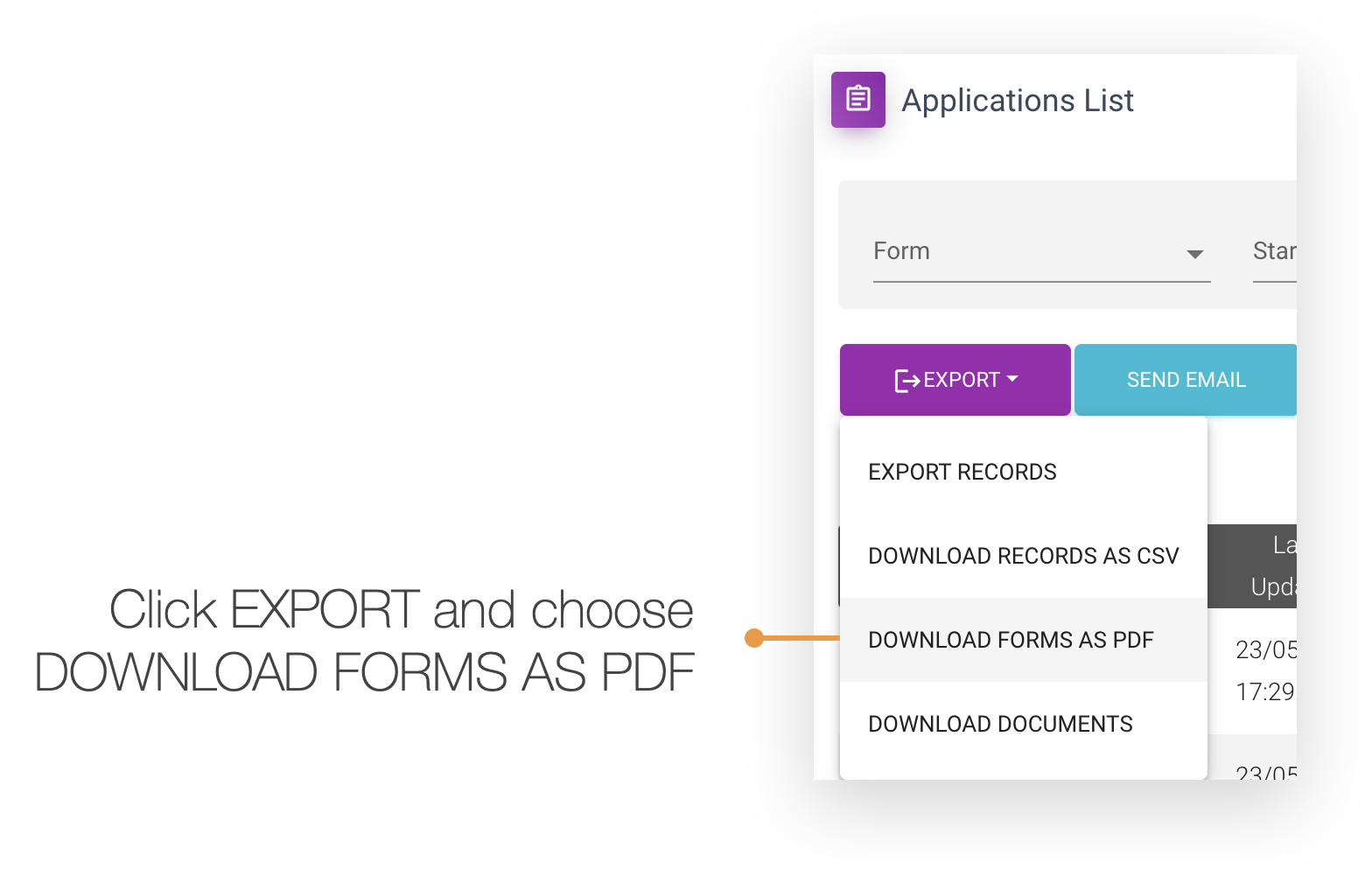
You can now download up to 10 forms from Apply by selecting the checkbox next to the application and clicking the EXPORT> DOWNLOAD FORMS AS PDF. Once you do, you will be presented with a dialog letting you know that the process has started and you will be notified once complete.
Email Template Selector
Email templates are accessible from Event RSVP list, Student List/Details and Application List/Details screens. Now when you choose to send an email to selected user(s) you are presented with a searchable dropdown list of templates in alphabetical order. So much better!
Default Order for Student List
The default state for the student list is unsorted where the most recent added student record is at the top of the list. This allows you to quickly see the most recent enquiries that have come in for your school.
Event Specific Registration Forms
You can now specify multiple event types to appear on a particular event registration form. This is important when you want a family only to see or register for certain types of events. Until now, this was limited to a single event type.
Read this article to learn more about how this can help your school.
Apply Enhancements
Many of our schools are using Apply for a variety of forms - from applications to letters of offer, and as such we have taken the step to make sure the process works for all types of forms by making the following changes:
- The progress dialog no longer refers to applications
- The thank you page text now matches the relevant form name
- Download docs is disabled when there are no docs to download
- Translation is maintained to default language after start/continue when filling out a from
Improvements
We have made several improvements in the following areas:
- The vertical axis for our horizontal bar charts expands automatically when many labels are present
- Corrected the grammar for Students' Details on the event registration form
- We have increased password complexity for new users to be at least 14 characters with complexity
- Addressed the issue where lead score did not consistently align from list view with details screen
- App form email template now includes insert fields for Student First and Last Name
- Fixed an issue where text is cut off in generated PDF applications